
-
Please be sure to read the rules and adhere to them. Some banned members have complained that they are not spammers. But they spammed us. Some even tried to redirect our members to other forums. Duh. Be smart. Read the rules and adhere to them and we will all get along just fine. Cheers. :beer: Link to the rules: https://www.forumsforums.com/threads/forum-rules-info.2974/
You are using an out of date browser. It may not display this or other websites correctly.
You should upgrade or use an alternative browser.
You should upgrade or use an alternative browser.
Snow Trac in Iceland
- Thread starter villi
- Start date


Villi,
There is a limit on the size of photos you can upload, so first you need to make sure your photos are not too big. I usually re-size my photos to 72dpi and size them to roughly 600x400.
When you have your photos ready, click on the POST REPLY button type what ever message you want to write to describe your pictures. Then scroll down the page and you will see a button named MANAGE ATTACHMENTS. Click on that button. A small window should pop up on your screen with 3 empty lines and 3 buttons that say BROWSE. Click on one of the BROWSE buttons and it will let you search your computer for your photo. When you find it, click OK or OPEN. You can post up to 3 photos in each post. After you load your photos with the BROWSE buttons, you need to click the UPLOAD button to copy the photos to your post. After that is done, close the window. Then click the SUBMIT REPLY button.
The instructions I gave are what I see using Firefox. If you use a different browers, your instructions may appear a little differntly but probably will work the same.
There is a limit on the size of photos you can upload, so first you need to make sure your photos are not too big. I usually re-size my photos to 72dpi and size them to roughly 600x400.
When you have your photos ready, click on the POST REPLY button type what ever message you want to write to describe your pictures. Then scroll down the page and you will see a button named MANAGE ATTACHMENTS. Click on that button. A small window should pop up on your screen with 3 empty lines and 3 buttons that say BROWSE. Click on one of the BROWSE buttons and it will let you search your computer for your photo. When you find it, click OK or OPEN. You can post up to 3 photos in each post. After you load your photos with the BROWSE buttons, you need to click the UPLOAD button to copy the photos to your post. After that is done, close the window. Then click the SUBMIT REPLY button.
The instructions I gave are what I see using Firefox. If you use a different browers, your instructions may appear a little differntly but probably will work the same.
B_Skurka said:The instructions I gave are what I see using Firefox. If you use a different browers, your instructions may appear a little differntly but probably will work the same.
Internet Exploder is the same.



BoneheadNW
Active member
Bob, calm down now. You know that it's not good for your blood pressure! Also, the drool is not good for your keyboard.
Bonehead
Bonehead
Villi . . .
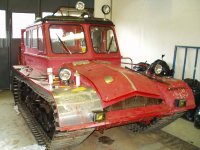
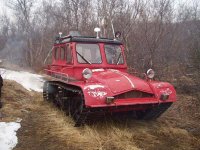
Based on the serial number, it looks like yours was made in 1975.
Mine was made in 1972 and also has the same track configuration you have with 2 large rubber tires and 4 small rubber tires on the bottom. Some of the Snow Tracs only have 1 large rubber tire and 6 small ones. Do you know if those are the older style or the newer style? I have not been able to track down the year they switched over from one style to the next. I think they started with the other style and switched to the configuration you and I own, but I'm not sure. Do you have any idea?
Bonehead . . .
The lovely Mrs_B is dialing 911 now.
Based on the serial number, it looks like yours was made in 1975.
Mine was made in 1972 and also has the same track configuration you have with 2 large rubber tires and 4 small rubber tires on the bottom. Some of the Snow Tracs only have 1 large rubber tire and 6 small ones. Do you know if those are the older style or the newer style? I have not been able to track down the year they switched over from one style to the next. I think they started with the other style and switched to the configuration you and I own, but I'm not sure. Do you have any idea?
Bonehead . . .
The lovely Mrs_B is dialing 911 now.

Snowcat Operations
Active member
Fantastic Snow Trac! You even striped it down to bare metal! Beautiful! Ahh hell key board shorting out. Ok I am going RED on my Snow Masters for sure. I was going to go Orange (to match what was painted before but RED just RULES! Very NICE job Villi!

Bob - after they are finished with the defibrillator and you book your flight to Iceland, you need to get to work with your sander. That is a good restoration!
Nice work Villi!
Man - if it ever snowed here I'd be looking for one of those. They are way cool.
Nice work Villi!
Man - if it ever snowed here I'd be looking for one of those. They are way cool.
Snowcat Operations
Active member
VILLI,
Can you post more pictures of the restoration process? What type of primer did you use? I have been thinking about an epxoy based primer and paint.
Can you post more pictures of the restoration process? What type of primer did you use? I have been thinking about an epxoy based primer and paint.
Snowcat Operations said:Fantastic Snow Trac! You even striped it down to bare metal! Beautiful! Ahh hell key board shorting out. Ok I am going RED on my Snow Masters for sure. I was going to go Orange (to match what was painted before but RED just RULES! Very NICE job Villi!
The factory produced Snow Tracs for civilian use were all a Reddish-Orange color. What surprises me is that so many people have stuck with that color. There are plenty of examples of people who painted them other colors at some point but then ended up repainting them the original color scheme. Personally I don't like the original color.
I'm thinking of repainting mine with either a total custom paint job, a bright red paint like Villi has, or British military green paint, which is one of the two military color schemes that I've been able to find (the other is white/black snow camo).
Why do people keep these things Red-Orange? I don't see any 'collector' value in Snow Tracs based on the paint job. The value seems to be in the general condition of the machine and if it has the majority of the parts. Am I wrong?
Below are some NON-stock paint jobs.
Attachments


Snowcat Operations
Active member
BOB,
Mine are painted saftey orange. High visibility. Kinda like how Cal trans or other highway road crews. I was going to stay with the same color since the inside is that way as well but not anymore. I think I will go with a Red outside with black Rhino linning on the outer decks. Inside I will go all grey with black interior. Rhino line the floor as well.
Mine are painted saftey orange. High visibility. Kinda like how Cal trans or other highway road crews. I was going to stay with the same color since the inside is that way as well but not anymore. I think I will go with a Red outside with black Rhino linning on the outer decks. Inside I will go all grey with black interior. Rhino line the floor as well.

villi
Member
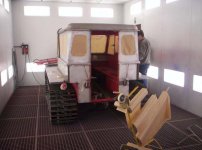
I am a member and chairman of a local volunteer rescue unit and this Snow Trac is one of the equipment of the rescue unit. We meet evry Monday at the station to maintain the equipment
and fix the Snow Trac, this project is under my guidance. The paint was stript off with paintstripper and sandpaper and iron sandblasted , next to a professional autopainter he used a epoxy based primer and truck paint # RAL 3020. This project started 2 yars ago and is almost finish , Im going to make a luggage rack on top of the cabin.
and fix the Snow Trac, this project is under my guidance. The paint was stript off with paintstripper and sandpaper and iron sandblasted , next to a professional autopainter he used a epoxy based primer and truck paint # RAL 3020. This project started 2 yars ago and is almost finish , Im going to make a luggage rack on top of the cabin.
Attachments


Snowcat Operations
Active member
VILLI,
Did you replace all the glass as well? Was the rubber stripping avilable localy or did you re-use the old stuff.
Did you replace all the glass as well? Was the rubber stripping avilable localy or did you re-use the old stuff.
Snowcat Operations
Active member
Yes that would be two tanks. That was an option. Not very many of those around!

Junkman
Extra Super Moderator
The rubber glass seals are a standard item from what it appears to me. I would check with a local auto glass shop to see if they have it or can get it. I can't remember the exact name of the place that I used to purchase auto glass supplies, but I will do some checking this weekend to see if I can find it. Junk...
Snowcat Operations
Active member
Thanks "Junk"!
Junkman said:The rubber glass seals are a standard item from what it appears to me. I would check with a local auto glass shop to see if they have it or can get it. I can't remember the exact name of the place that I used to purchase auto glass supplies, but I will do some checking this weekend to see if I can find it. Junk...
Some of the discount auto parts catalogues also carry the replacement rubber. It is available by the foot or in rolls. I know JC Whitney (www.jcw.com) sells it, 16' rolls cost $36.99. They are made by Fairchild Industries in several styles.
Last edited:


